Runs locally · Self-evolving · Free

An agent team for everyone You grow the experts — you don’t have to be one

Say who it is and how it works — it does the real job on your machine. Every finished task leaves a skill or a memory behind, so it grows into what you trained.

Free · No account · Data stays on your machine by default

For indie developers, small teams, anyone handing work over

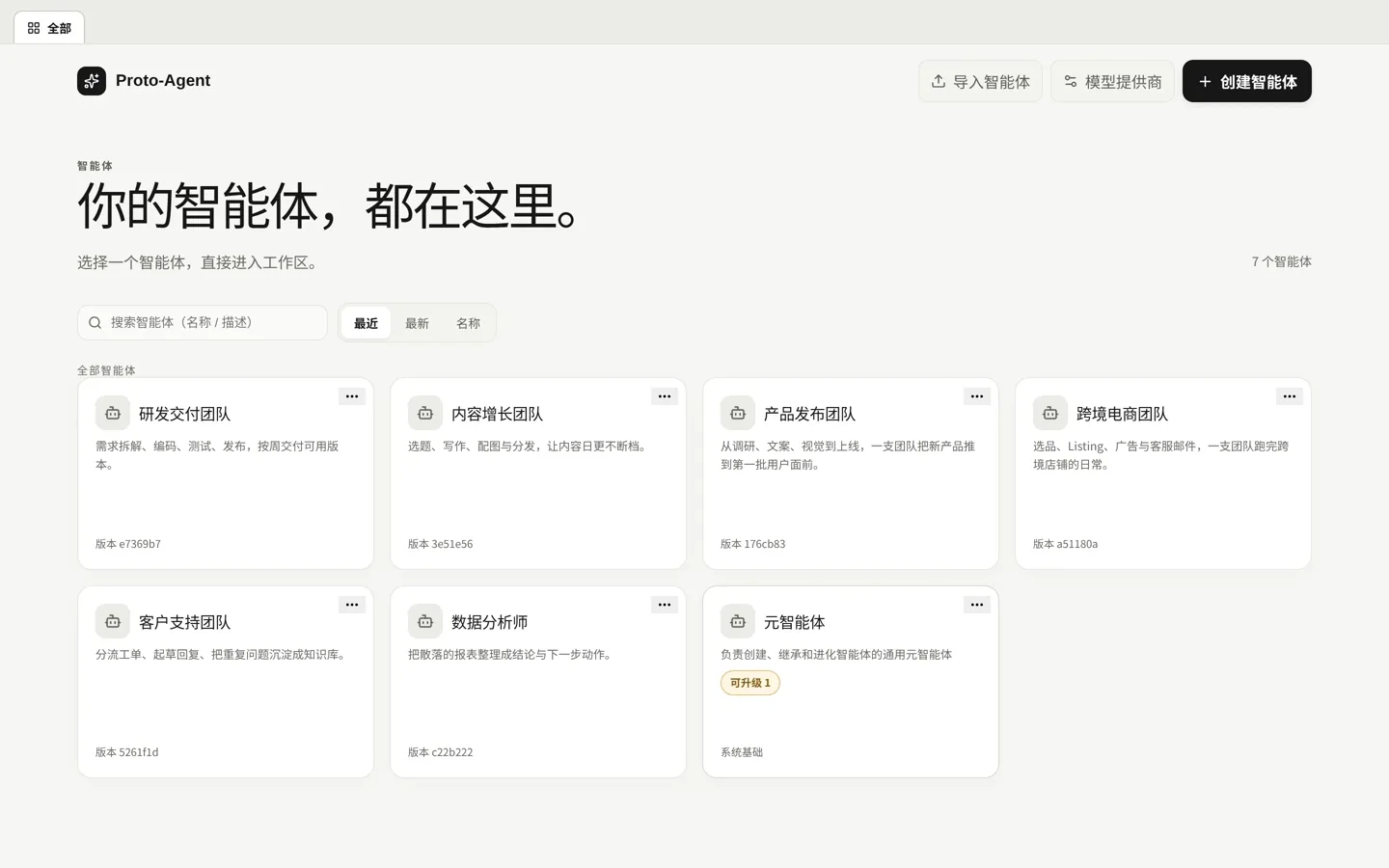
The Putong-Agent catalog: an agent list on the left and agent cards on the right, each showing name, description and revision.
Agent catalog · open any member and it gets to work
0
Ads, tracking or sign-up screens
3
platforms: Windows · Linux · macOS
6
Asset types: identity · skills · knowledge · memory · experience · workflows
100%
Conversations and files stay on your machine
Self-evolution

The same job, the first time and the fifth

The difference is not the model — it is what the agent keeps for itself.

First time
  • You spell out who it is and what it owns
  • You walk it through the method, over several rounds
  • You watch every result
Fifth time
  • One sentence and it starts
  • It runs the method it kept last time
  • It stops only where your decision is required

What sits between them: the changes you approved. Methods settle into Skills, conclusions into Knowledge, preferences into Memory.

Capabilities

Self-evolving. Self-learning. Built to accumulate.

Not a tool you use once — a team that grows with the work.

Every agent carries its own skills

Who it is, what it can do, what it remembers — all carried by the agent itself. Copy it, move it, manage it like code.

Swap the model, keep the agent

Use one model today and another tomorrow. Switch engines and carry on — no retraining needed.

Sharper with every job

Every job settles into skills and knowledge — the second time around is faster.

Serious work stays on track

Step by step where it matters, pausing for your go-ahead at key points. Interrupted? It picks up where it left off.

Asks before it changes itself

It spots its own gaps and proposes improvements, then waits for your go-ahead. Every change is on record, and always reversible.

Your data stays on your computer

Files and conversations stay local. Only the model service you configure ever receives a request.

How it works

Four steps to a team of your own

From install to your first agent improving itself — in minutes.

  1. 01

    Download & launch

    Install the package, then open http://127.0.0.1:8091/ in your browser.

  2. 02

    Build your team

    Create an agent per role: who it is, what it owns, and whatever it needs to do the job well.

  3. 03

    Set it to real work

    The agent puts its capabilities to work — and keeps the process and the experience.

  4. 04

    Approve its evolution

    When it finds a lasting gap, it brings you a plan. You approve, it makes the change, and nothing takes effect until the checks pass.

Security & privacy

Local by default

Local deployment means your agents, sessions and data stay on your own machine.

Conversations and files stay local

Agents, sessions, attachments and model connections live on your own machine; reinstalls and upgrades do not lose them.

One default outbound call: update checks

No ads, no third-party tracking. It checks for updates every 6 hours by default (can be turned off in Settings) and never sends conversation content.

It reports before changing itself

When it finds a lasting gap it brings a plan first; it only acts on the paths you approve, and every change is on record and reversible.

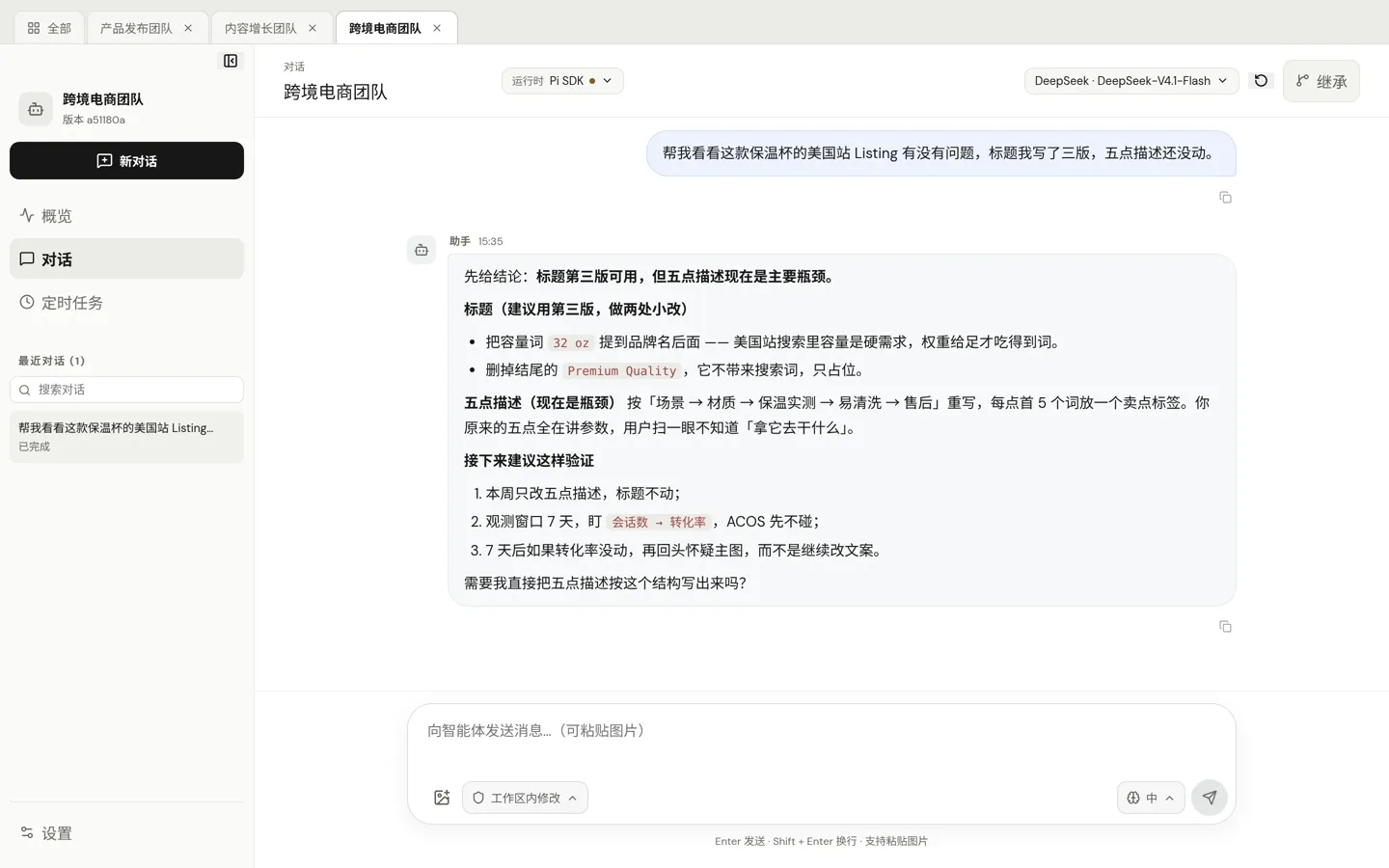
Cross-border e-commerce

The chat is the workbench

Sourcer · Lister · Ad buyer · Support

Ask in plain language and get a conclusion plus the next step — not a pile of raw material to sort out yourself.

A chat view: the user asks for a listing review, and the assistant answers with a conclusion followed by concrete title and bullet revisions.
Store team · a real conversation: the answer first, then the fix and how to check it
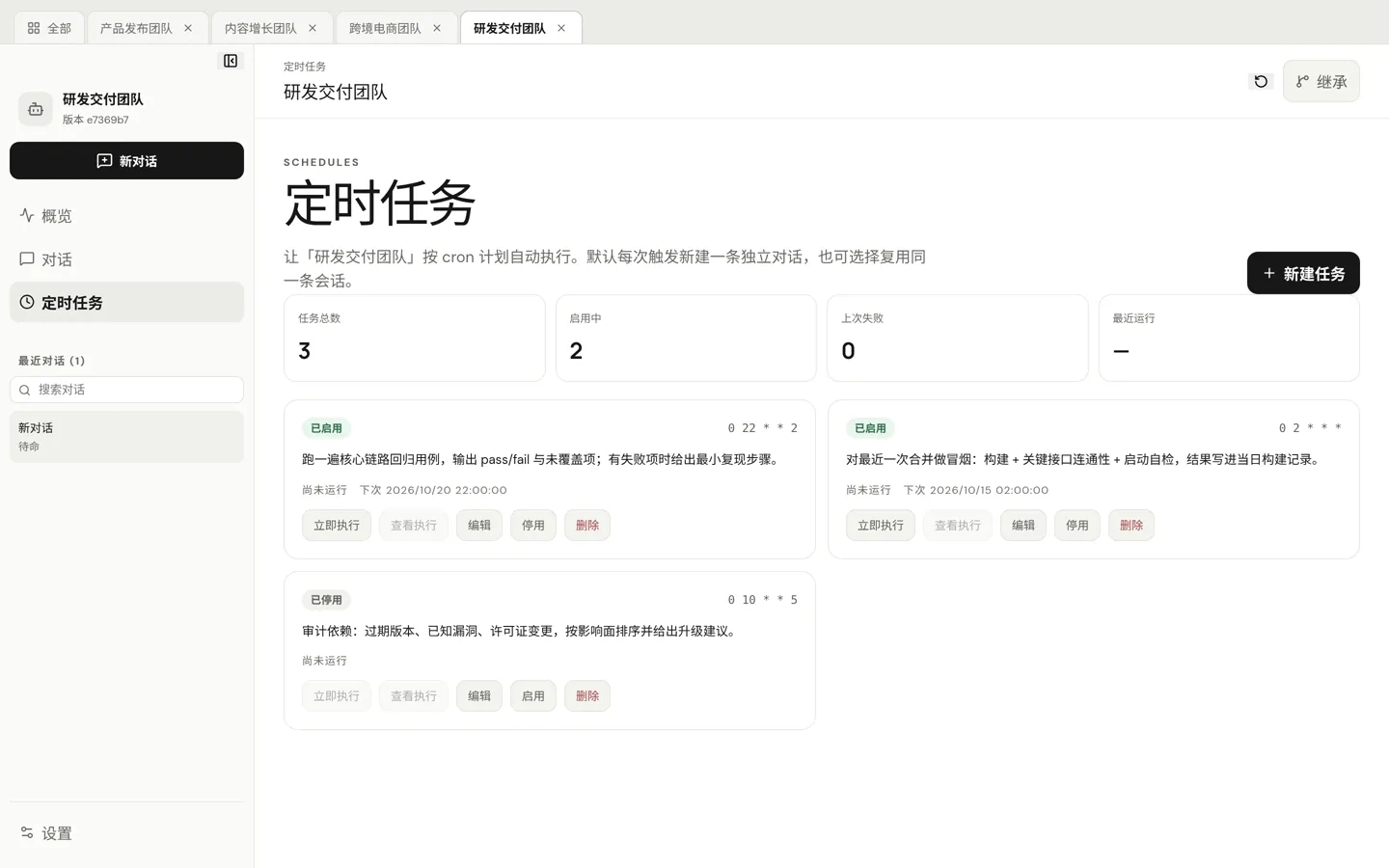
Software engineering

It runs on schedule

Architect · Backend · Frontend · QA · Releaser

Regression, smoke tests and dependency audits sit on cron and fire on their own — each run leaves a traceable conversation.

A schedules view showing task totals, enabled count, last failures and recent runs, with each task’s cron expression, prompt, next run time and actions.
Delivery team · schedules: it fires on time by itself, and every run leaves a conversation behind
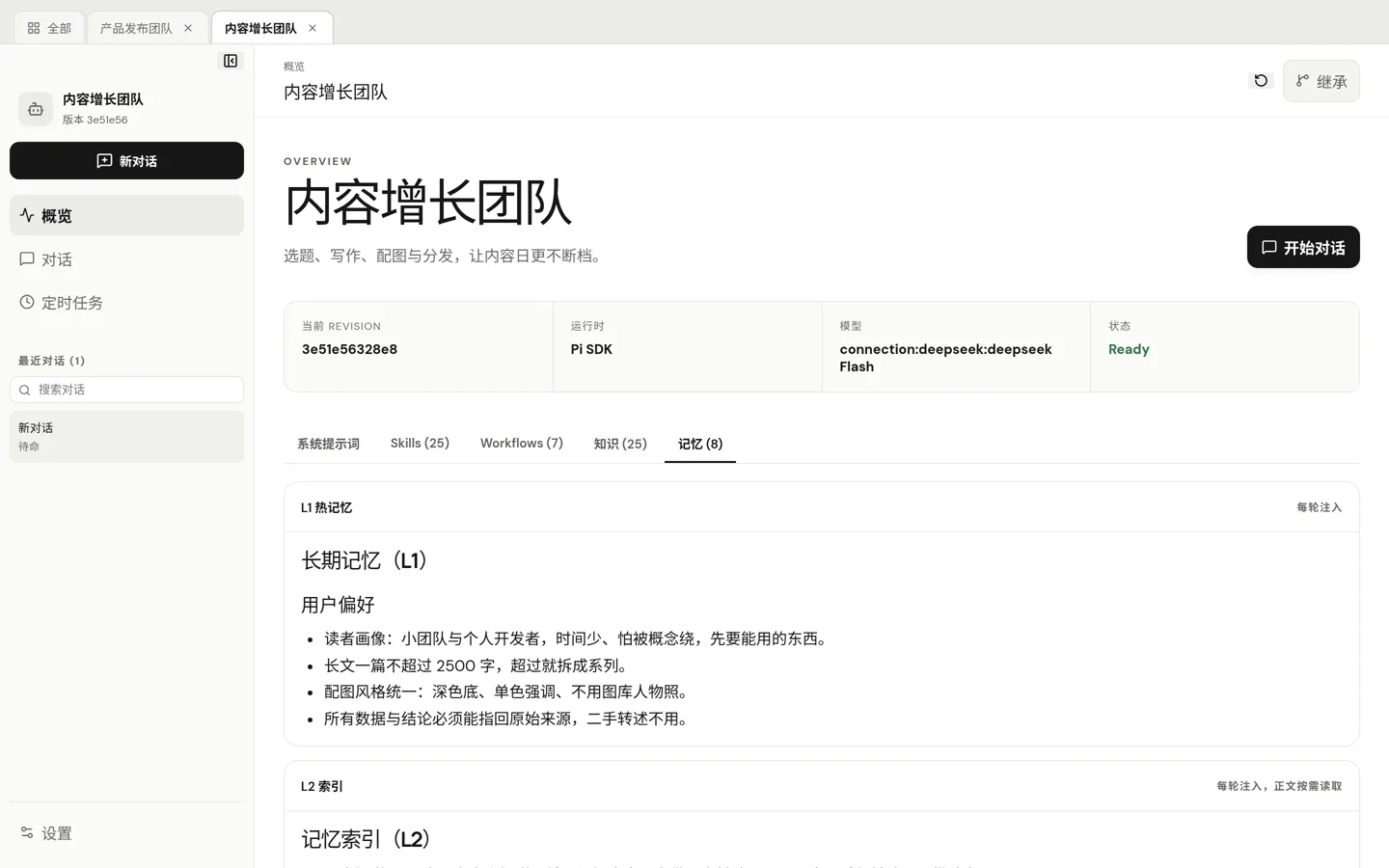
Content & growth

It learns how you work

Ideation · Writer · Editor · Publisher

Preferences, definitions and channel rules go into memory and ride along every round — no re-briefing.

A memory view listing hot memory injected every round, above long-term entries such as user preferences, writing rules and channel conventions.
Content team · memory: written once, loaded in every round after that
Quick start

Two commands, two minutes

The runtime ships in the package: no Node install, no Docker, no account.

On Linux, extract the tarball, enter the folder and run ./start.sh; on Windows, just run the installer. Then add a model provider in Settings to start dispatching work.

terminal
# Linux (x64)
tar -xzf proto-agent-0.1.93-linux-x64.tar.gz
cd proto-agent-0.1.93-linux-x64
./start.sh
# → http://127.0.0.1:8091/

# Windows
Proto-Agent-Setup-0.1.93.exe
FAQ

Good to know

How is this different from other agent tools?

Those are tools you use and leave. Here every agent keeps its methods and experience — and it never changes itself without your approval.

Is Putong-Agent free?

Yes. Free for individuals and teams; enterprises can purchase customization and support. The product is source-closed.

Do I need to write code?

No. Describe who the agent is and what it owns and it can start; if you want to go deeper, its assets are managed like code.

Which model, and what does it cost?

OpenAI, Anthropic or any compatible endpoint, with your own key. The software is free; you only pay your model provider.

Does it need internet?

Not by itself. Network is needed only when you call a model provider, and that request is configured by you.

Is my data uploaded?

Conversations, files and attachments stay on your machine. The only default outbound call is the update check (version, OS class and a random local ID), which you can turn off. No ads, no third-party tracking.

Which systems are supported?

Packaged today: Windows · Linux · macOS. Once downloads open, packages are on the download page.

Hire the first member of your team

Free, runs locally, and your data stays on your own computer.
Download free